
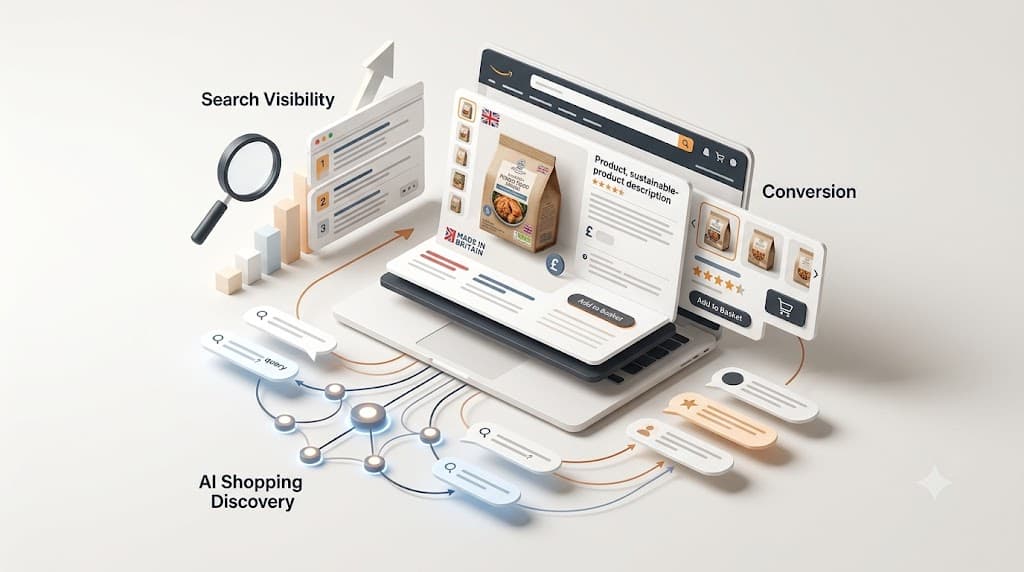
Your Amazon listing is doing three jobs simultaneously, and most sellers only optimise for one of them.
The first job is to rank — to appear when a shopper searches for something your product is relevant to. The second job is to convert — to turn that click into a purchase once a shopper lands on your product page. The third job, increasingly important in 2026, is to be found by Rufus, Amazon’s AI shopping assistant, which now handles hundreds of millions of daily queries and surfaces products through a completely separate mechanism to traditional keyword search.
A listing optimised only for keywords tends to rank but not convert. A listing optimised only for conversion tends to look good to the humans who find it but never reaches them at scale. And a listing that ignores AI discovery leaves a third traffic source untapped at a moment when it’s growing faster than any other on the platform.
This guide covers every element of a modern Amazon listing — what it is, how to approach it, and how it fits into the overall system that determines whether your product sells. If you’re still getting started on Amazon, our beginner’s guide to selling on Amazon UK provides the broader foundation. If you’ve already got listings live and want to understand why they’re not performing, this is the right place to start.
Before you begin: Amazon is rolling out a significant structural change to product titles on 27 July 2026 — the largest title format change in years. A dedicated section below explains what’s changing and what to do about it.
How Amazon’s A10 algorithm ranks listings
Amazon’s search algorithm — known in the industry as A10 — determines which products appear for a given search and in what order. Understanding what it prioritises helps you focus your optimisation effort on the things that actually move rankings rather than the things that used to matter and no longer do.
The A10 algorithm weighs three primary signals above everything else:
Relevance to the search query. This is determined by the structured content fields in your listing — your title, bullet points, product description, backend keywords, and category attributes. If a keyword doesn’t appear anywhere in your indexed content, Amazon cannot surface your product for that search, regardless of how well it sells. Relevance is the prerequisite.
Conversion rate on that query. A product that earns clicks and converts them to purchases signals to the algorithm that it’s a genuinely good match for that search. This is why listing quality matters for rankings as well as for sales: a stronger listing converts better, which signals stronger relevance, which earns higher organic placement, which brings more traffic. The flywheel runs in both directions — a weak listing also runs it in both directions, just the wrong way.
Sales velocity and external traffic. The A10 algorithm rewards products with consistent sales momentum and penalises products that run out of stock or experience erratic sales patterns. External traffic — from social media, Google, email — that converts on Amazon is weighted positively as a trust signal that the product performs across multiple purchase contexts.
Note what’s not on this list: keyword density, title keyword stuffing, or repeating terms across multiple fields hoping for additive ranking benefit. Those tactics circulate widely in outdated guides and have been actively penalised by the algorithm for several years. The goal is one instance of each keyword in the highest-priority field you can fit it in, then natural, persuasive language for everything else.
Rufus: the third surface you now need to optimise for
Rufus is Amazon’s generative AI shopping assistant. Shoppers use it to ask natural-language questions (“What’s the best travel adaptor for South-East Asia?”), compare options, and get personalised recommendations. As of early 2026, Rufus handles over 300 million users and generated nearly £10 billion in incremental sales on the platform during 2025 alone.
The crucial detail for sellers: only 22% of Rufus recommendations overlap with traditional first-page keyword search results. This means Rufus is sending significant volume to products that don’t rank on page one — and missing from Rufus results means missing traffic that your keyword ranking alone would never have captured.
Rufus reads your entire listing — title, bullets, description, A+ Content, images (it can extract product attributes from images), and customer reviews — and uses it to answer conversational queries. The listing that performs well with Rufus is one written in natural language that clearly communicates what the product is, who it’s for, what problems it solves, and what makes it different. Keyword-stuffed copy that reads like a string of search terms confuses Rufus in the same way it confuses a human reader. Complete product attribute fields in Seller Central — every empty field is information Rufus can’t use when deciding whether your product matches a shopper’s question.
The practical optimisation instruction: write every listing element as if you’re answering a customer’s question, not filling a keyword template. The two approaches are compatible; one is just a more durable basis for writing than the other.
The product title: major change in effect from 27 July 2026
The title is the single most important field on your listing — the first thing the algorithm indexes, the first thing shoppers see in search results, and the primary input Rufus uses when evaluating your product.
Amazon is changing how titles work. From 27 July 2026, product titles across all non-media categories on Amazon UK (and European stores) are capped at 75 characters including spaces, down from the previous limit of up to 200 characters. A new searchable field called Item Highlights — up to 125 characters — is launching alongside it, intended for the secondary detail (size specifications, quantity, material, use case clarifiers) that previously lived in the second half of longer titles. Amazon’s system will automatically rewrite titles that exceed 75 characters.
What this means practically:
Your 75 characters must contain your brand name at the start and your primary keyword — they take priority over everything else. Write them as tightly as possible. Secondary attributes — colour, material, pack size, compatibility — move to the Item Highlights field, not the title itself.
Special characters have been prohibited in titles since January 2025. Keyword repetition is also restricted. Both of these rules remain in force under the new format.
Since mobile screens show only the first 60–80 characters of a title in search results, and the new cap is 75, the two constraints now largely align. Write for mobile first and you’re writing for the new format automatically.
Sellers who have long titles currently live in their listings should audit them now rather than waiting for Amazon’s automatic rewrite, which will remove whatever it considers secondary — not necessarily what you would choose to cut.
Bullet points: where features become reasons to buy
Five bullet points. The first two carry the most algorithmic weight for keyword indexing, and the most practical weight for shoppers who scan rather than read. Use both strategically.
The structure that performs consistently: a short, capitalised hook phrase that leads with the primary benefit, followed by the supporting feature or specification that justifies it. Not “Made of 304 stainless steel” but “STAYS SHARP FOR YEARS: 304-grade stainless steel construction that resists corrosion through daily use.” The feature is still there — the specification is still there — but the reader’s first impression is a benefit, not a material code.
Practical guidelines for 2026:
- Keep each bullet under 200 characters. Amazon recommends a total of under 1,000 characters across all five.
- Place your most important secondary keywords (those that didn’t fit in the 75-character title) in the first 100 characters of bullets one and two.
- Don’t repeat keywords from your title. Each instance counts once for indexing regardless of repetition, so repetition wastes character space.
- Don’t use bullet five as a terms-and-conditions dumping ground (“Note: colour may vary slightly due to monitor settings…”). Use it to sell.
- On mobile, only the first three bullets display without scrolling — make those three do the most work.
Backend search terms: index what didn’t fit anywhere else
The backend search terms field in Seller Central is invisible to shoppers and exists entirely for indexing — it’s where you put terms that are relevant to your product but didn’t make it into the title or bullets naturally.
The current limit is 249 bytes (not characters — non-ASCII characters count as more than one byte). Fill it without exceeding the limit. Any keywords already present in your title or bullets don’t need to be repeated here and won’t gain any additional ranking benefit from repetition. Use the space for genuine additions: common misspellings, regional spelling variants (colour/color), synonyms, complementary use cases, and secondary keywords that are relevant but less central.
Don’t use competitor brand names, restricted terms, or subjective claims. Amazon polices this field and violations can result in listing suppression.
Product description and A+ Content
If you don’t have Brand Registry, your product description is the text block below the bullet points — up to 2,000 characters, displayed below the fold for most desktop users and sometimes above bullets on mobile depending on category. It contributes to keyword indexing and gives you space to build on the benefits the bullets introduced. State what the product is, what it does, and who it’s for. Avoid promotional language (“sale”, “special offer”, “free shipping”) — Amazon prohibits it in the description field.
If you have Brand Registry, A+ Content replaces the standard product description with a modular, image-led layout that allows comparison tables, feature callouts, lifestyle images with overlaid text, and brand story panels. <cite index=”12-1″>A+ Content typically takes 30–60 days to show measurable conversion improvement, because it lifts conversion gradually rather than producing an immediate spike</cite> — but the lift is real and compounds over time. It also signals brand credibility to shoppers who are comparing your listing to a plain-text competitor.
Premium A+ Content — available to sellers who have published a certain number of standard A+ modules — adds video, interactive hotspots, and enhanced comparison charts. For products with multiple variants or complex features, it can meaningfully reduce the hesitation that prevents a first purchase from an unfamiliar brand.
Gaining access to A+ Content requires Brand Registry, which in turn requires a registered trademark. If you haven’t started that process yet, it’s worth beginning — trademark registration with the UK Intellectual Property Office typically takes four to six months, and the full suite of Brand Registry benefits available once it comes through is substantial. Our brand development team can walk you through the trademark and registry process alongside the creative work. Once you have access, our A+ listings and enhanced content service handles the module design and build.
Images: the conversion layer
Images don’t directly affect keyword ranking, but they drive click-through rate and conversion — two of the three signals the A10 algorithm uses for ranking decisions. Weak images suppress both, which means they indirectly suppress organic position over time.
Amazon allows up to nine image slots. Use all of them. The breakdown that performs consistently in 2026:
- Main image: White background (RGB 255,255,255), product filling at least 85% of the frame. No text, no props, no lifestyle context — Amazon’s rules, not a style choice.
- Lifestyle images (two to three): Product in real-world use, showing scale and context. The shopper should be able to picture themselves with it.
- Infographic images (two): The product’s primary features or benefits called out with annotations — dimensions, material callouts, key differentiators. These address the questions a shopper has before they read the bullets.
- Scale image: Something familiar in frame — a hand, a common object — that tells the shopper exactly how large or small the product is. Return rates for products that arrive at an unexpected size are consistently higher than for products that managed the expectation clearly.
- Comparison image: Your product against the generic/unbranded alternative, showing the specific improvement you’ve made. Useful for products launched on the back of review mining.
With 70–75% of Amazon traffic now coming from mobile devices, every image needs to read clearly at thumbnail size. Text on infographic images that’s legible on a 27-inch monitor is often illegible on a phone screen — design at mobile size first.
Product attributes: the most underused ranking field
Seller Central contains hundreds of category-specific attribute fields beyond the headline listing elements — material, intended use, target audience, subject matter, dimensions, compatibility, and many more depending on your category. The majority of sellers leave most of these blank.
<cite index=”14-1″>Every empty attribute field is a gap in the information the algorithm uses to match your product to relevant searches.</cite> Filling them in — particularly the intended use, target audience, and style fields — feeds both A10’s categorisation signals and Rufus’s ability to match your product to conversational queries. A shopper asking Rufus “What’s the best non-stick pan for induction hobs under £40?” gets better answers from listings that have “induction compatible” set as an attribute than from listings whose description mentions it once in a paragraph.
This is unglamorous work — going through every attribute field for every product in a catalogue is time-consuming and requires care — but it compounds. Sellers who’ve done it thoroughly consistently report ranking improvements in searches they never specifically optimised for, because the attribute data is surfacing their products for queries they’d otherwise have missed entirely.
Pricing and the Buy Box
Listing optimisation is incomplete without addressing pricing. The Buy Box — the primary “Add to Basket” button on a product page — is awarded by Amazon’s algorithm based on a combination of factors, with competitive price, fulfilment method, seller metrics, and in-stock availability being the primary ones. On most product pages, the Buy Box winner takes the overwhelming majority of sales even when other sellers offer the same product.
For private label sellers with sole control of their listing, the Buy Box is generally not an issue. For wholesale sellers sharing a listing with others, automated repricing software that adjusts your price continuously in response to competitor changes maintains Buy Box eligibility without requiring manual monitoring. Treating pricing as separate from listing management causes avoidable Buy Box losses.
How quickly do listing optimisation changes take effect?
<cite index=”15-1″>Title and keyword changes typically show ranking movement within 7 to 14 days as Amazon reindexes. Image and bullet changes show conversion changes within a week or two. A+ Content takes longer — sometimes 30 to 60 days — because it lifts conversion gradually rather than dramatically.</cite>
This means the order of operations matters: prioritise title and keyword changes first for the fastest ranking signal, then bullet points, then images, then A+ Content. Don’t make every change simultaneously if you want to understand which changes are producing results.
Listing optimisation is a system, not a one-time task
The sellers who consistently hold page-one positions in competitive categories treat their listings as living documents. Keyword landscapes shift as new competitors enter and as seasonal demand changes search patterns. A competitor improving their listing quality changes the conversion benchmark you’re being measured against. Amazon updates its algorithm several times a year, and what worked in 2024 doesn’t always work in 2026.
A practical maintenance schedule: title and keyword audit quarterly; image review every six months or when you change packaging; bullet points reviewed when conversion rate data shows a sustained dip; A+ Content refreshed when you update your product or brand positioning. The listings that fall behind are almost always ones where nothing was touched after the initial build.
If you’d prefer to have your listings built and maintained professionally — with ongoing keyword monitoring, conversion rate tracking, and updates as the algorithm and marketplace evolve — our product listing service handles exactly that, as an ongoing engagement rather than a one-off project. You can see the kind of ranking and conversion results that approach produces in our case studies.
Frequently asked questions
Does keyword density still matter for Amazon listing rankings? No. The A10 algorithm indexes a keyword once — having it appear three times in the same field provides no additional ranking benefit and wastes character space that could be used for other relevant terms. Focus on placing each keyword in the highest-priority field it can naturally fit into, then move on.
How many keywords should I include in a listing? As many as fit naturally across the title, bullets, description, and backend search terms without repetition. There’s no meaningful ceiling — the constraint is that everything added should be genuinely relevant to the product, not a stretch to claim relevance. Irrelevant keywords that bring unqualified traffic can damage your conversion rate, which harms rankings.
Is A+ Content worth doing if I only have one product? Yes, provided you have Brand Registry. A+ Content consistently improves conversion rates versus the plain-text description it replaces, and the Brand Registry process itself — which takes 4–6 months for a UK trademark — becomes more valuable the longer you’re on Amazon. Start it early.
What happens to my title if I don’t update it before the 27 July 2026 cap? Amazon will automatically rewrite titles that exceed 75 characters, removing content it considers secondary. You don’t control what it removes. Auditing and updating your own titles before the automated rollout is strongly preferable to having Amazon edit them for you.
How important are reviews to listing performance? Very. Reviews feed into conversion rate both directly (social proof that drives buyer confidence) and indirectly (Amazon’s review quality and recency signals feed into A10 ranking). A product with 100 reviews and a 4.5-star average almost always converts better than an identical product with 10 reviews and the same rating — the volume of proof matters alongside the rating itself.
Should I use all nine image slots even if I don’t have nine good images? Use however many you have strong images for. A weak image — blurry, poorly lit, or providing no new information to the shopper — is worse than an empty slot, because it dilutes the visual quality signal and can actively increase hesitation. Build up to nine as you create more content, rather than filling slots for the sake of it.
Want your listings audited by specialists?
A listing audit is often the fastest way to find out why a product that should be working isn’t converting, or why a product with good ad spend isn’t holding its organic position. Get in touch with us and we can take a look at where your listings are, where the gaps are, and what’s worth fixing first.