
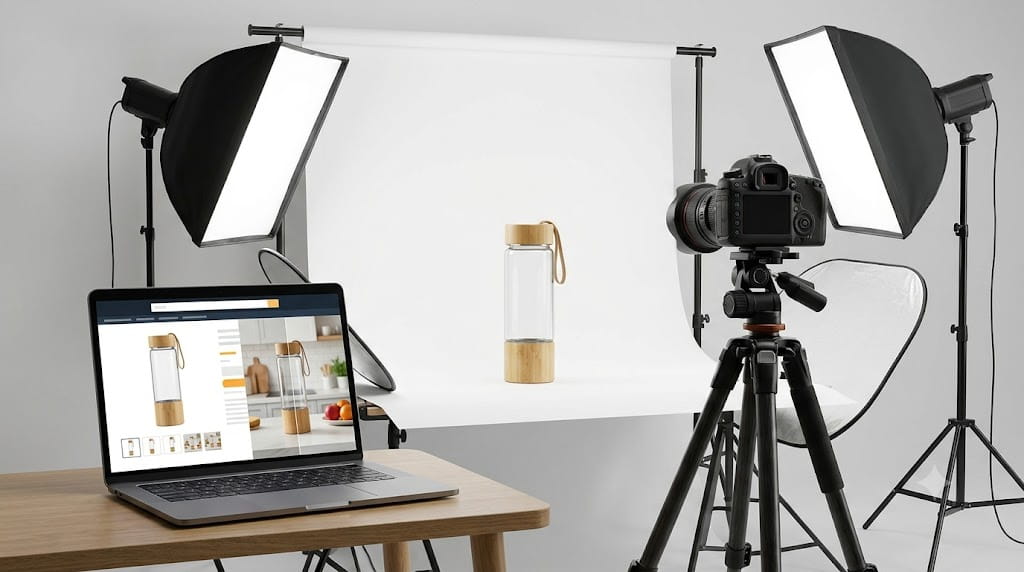
Before a shopper reads your title, your bullets, or your price, they’ve already made a provisional judgement about your product. It happens in under three seconds and it’s based almost entirely on your main image.
Product photography is the conversion layer that everything else depends on. Your keyword ranking determines whether someone sees your listing. Your price determines whether the economics look reasonable. But your images determine whether they click, whether they stay, and whether they buy. Around 67% of consumers cite image quality as the most critical factor in their purchase decision — higher than price, higher than reviews, higher than anything else a listing contains.
This matters doubly on Amazon because you have almost no control over how your listing is displayed compared with competitors. The grid of search results is standardised. Your main image is the primary differentiator in that grid. It’s the one element of your listing that has to do its job before the shopper has even clicked.
Our Amazon listing optimisation guide covers all the elements that make a listing convert — images are one pillar of that system. This post goes deeper on the photography side specifically: the rules, the image sequence that performs, the honest case for professional photography vs AI, and the costs you should expect in the UK market in 2026.
The rules: what Amazon requires for your main image
Amazon’s main image requirements are non-negotiable. Violating them results in listing suppression — your product disappears from search results until you upload a compliant image. In 2026, Amazon’s enforcement has become more precise, catching non-compliant images that might have slipped through before.
The requirements for your main image (image position 1) are:
- Pure white background: RGB 255,255,255 — not off-white, not light grey, not cream. The precise colour code matters because Amazon’s product pages are built on white, and anything else creates a visible halo around your product.
- Product fill: The product must occupy at least 85% of the frame. Too much white space and the image looks small next to competitors who have filled the frame properly.
- No text, logos, watermarks, or graphics: The main image is the product only. No callouts, no promotional banners, no brand name overlaid on the image.
- No props or additional objects: Nothing in frame that isn’t included in the purchase. A kitchen knife photographed next to a chopping board implies the board comes with it, which creates the kind of customer expectation that generates returns.
- Accurate representation: Colour, size, and contents must reflect what actually arrives. Misrepresenting any of these is both a terms-of-service violation and a direct cause of negative reviews.
Technical specifications:
- Minimum 1,000 pixels on the longest side (below this, Amazon’s zoom feature is disabled — and shoppers who can’t zoom in convert at meaningfully lower rates)
- Recommended: 2,000–2,500 pixels on the longest side
- Maximum file size: 10MB per image
- Preferred format: JPEG at quality 90 for the best balance of visual quality and file size; PNG if you need transparency
- Aspect ratio: square (1:1) is the standard for most categories
Amazon’s no-text-on-hero-image rule and the 85% fill requirement are now caught more reliably through automated checks. Images that were accepted in previous years may fail under 2026 enforcement.
The 9-image sequence that converts
Amazon allows up to nine images per listing. Most listings that underperform on conversion are short on either quantity (fewer than six images) or variety (six versions of essentially the same angle). The nine-image sequence below reflects what consistently performs across categories in 2026.
Position 1 — Main image: White background, 85% fill, no text. The click-driver. Every other image builds on the click this one earns.
Position 2 — Lifestyle image: The product in use, in a real environment, by a real (or realistic) person or in a recognisable context. The shopper should be able to picture themselves with it within about two seconds of looking at this image. This is where emotional purchase intent starts to form.
Position 3 — Infographic (features): Your primary differentiators called out with text annotations directly on the image. Dimensions clearly labelled. Key material or construction detail highlighted. This image answers the questions a shopper would otherwise have to read the bullets to get answered — and most shoppers don’t read the bullets unless something stops them.
Position 4 — Scale reference: A hand, a common object, or a room context that tells the shopper exactly how large or small the product is before they read the dimensions. Return rates for products that arrive at an unexpected scale are consistently above average. One image that manages the expectation clearly prevents a significant proportion of those returns.
Position 5 — Second lifestyle image: A different context, different user type, or different use case from Position 2. If Position 2 shows the product in a kitchen, Position 5 might show it being packed for travel. The goal is to expand the range of buyers who see themselves in the images.
Position 6 — Infographic (benefits or comparison): Either a second round of feature callouts, or a side-by-side comparison showing how your product addresses the specific weaknesses you found in competitor reviews during product research. “Standard alternatives use X material — ours uses Y” is a genuinely persuasive image if the distinction is real.
Position 7 — Detail shot: A close-up of the quality indicator your product is most proud of. Stitching, material grain, joint construction, finish quality — whatever tells a shopper that this is a well-made object. This image speaks to buyers who’ve been burned by cheap alternatives before.
Position 8 — Packaging or unboxing shot: What arrives in the box, how it’s presented, and what’s included. Particularly valuable for products bought as gifts. Also reduces the uncertainty that drives returns from buyers who weren’t sure what to expect.
Position 9 — Social proof or certification image: A star rating summary, a “1,000+ five-star reviews” badge, relevant certifications (CE marking, BPA-free, FSC-certified timber, etc.), or a before/after comparison if relevant to your product type.
Note: Amazon displays seven images by default on desktop, though all nine are accessible. On mobile — which now accounts for 70–75% of Amazon traffic — the first few images receive disproportionate attention. Make positions 1 through 4 work independently of the rest.
AI-generated images in 2026: what’s allowed and what isn’t
AI tools have changed the economics of product photography significantly, and the market has consolidated quickly. The honest position for Amazon sellers in 2026 is this:
AI is allowed for secondary images. Amazon permits the use of AI tools to generate lifestyle backgrounds, create infographic overlays, produce scene variations, and perform background swaps on real product photographs. For positions 2–9, a real product photograph placed into an AI-generated scene is fully compliant.
The main image must be a real photograph. Amazon’s terms require position 1 to be an actual photograph of the physical product. Generating a main image from scratch using AI — one where the product itself is synthetic — is a violation and can result in suppression. Some categories (supplements, electronics) have seen tighter enforcement of this in 2026.
AI cannot misrepresent the product. Any AI editing must produce an image that accurately represents what the customer receives. Using AI to make a product look larger, a different colour, or of better quality than it physically is creates the same compliance problem as misrepresentative photography.
The practical approach most sellers are landing on: shoot the main image and one lifestyle image with a professional photographer (or carefully DIY), then use AI tools to generate scene variations, different context lifestyles, and infographic overlays at a fraction of the cost of booking another shoot. This hybrid workflow captures the quality of real photography where it matters most — the main image — and uses AI’s speed and cost advantages for everything else.
Professional photography vs DIY: when each makes sense
The honest answer depends on your product, your budget, and your catalogue size.
Professional photography makes sense when:
- Your product has complex textures, reflective surfaces, or fine detail that a phone camera won’t capture cleanly
- Lifestyle images require a specific setting or model (lifestyle shoots are the most expensive part of a professional brief and the hardest to convincingly DIY)
- You have a small number of SKUs where the per-unit cost of professional photography can be absorbed into margin
In the UK in 2026, a professional product photographer charges roughly £15–£50 per image for studio white-background shots. A full nine-image listing set with basic lifestyle photography typically runs £400–£1,200 depending on the product, location requirements, and whether model fees apply. More complex lifestyle productions — multiple settings, professional models, styled environments — run significantly higher.
Our product photography service handles full listing sets: main image, lifestyle, infographics, and scale shots, produced to Amazon’s specifications and optimised for the image slots where each type performs. You can see the output alongside sales results in our case studies.
DIY photography makes sense when:
- Your product is simple in shape, has flat or matte surfaces, and doesn’t require a specific lifestyle context
- You’re testing market viability before committing to professional images
- You have the right equipment: a modern smartphone camera, a good lightbox or softbox lighting setup, and a white background that genuinely photographs as pure white
The main risk with DIY photography isn’t the camera — modern phone cameras are capable of producing technically adequate images. It’s the lighting. Uneven lighting creates shadows that make a white background photograph grey, making the main image non-compliant. A lightbox (available for under £40 from most photography retailers) largely solves this for small products.
Video: the slot most sellers leave empty
Amazon allows one product video per listing, displayed below the image carousel on desktop and accessible from the image strip on mobile. Most sellers don’t use it. That’s a meaningful gap in their listings.
A 60–90 second product video showing the product in use, demonstrating the key feature or differentiator, and handling one or two common buyer objections converts meaningfully better than a listing relying on images alone — particularly for products with a functional benefit that’s difficult to convey through still photography. Supplement capsule size, how a fold-flat product works, how a cleaning product performs on a real surface — these are better shown in ten seconds of video than described in two hundred words of bullet points.
Video sits alongside photography as part of the same creative brief. If you’re booking a product shoot, it’s almost always worth capturing video content at the same time rather than treating it as a separate project. Our videography service works in combination with photography to give you a complete nine-image stack plus video from a single production.
Once you have Brand Registry, video is also the most powerful element of A+ Content and Sponsored Brands creative. The A+ Content and enhanced brand content toolkit becomes significantly more effective with video assets behind it.
When to refresh your product images
Images that were adequate at launch may be underperforming now for any of three reasons: competitor image quality has improved and the bar in your category has risen; your product itself has changed (packaging update, new variant, reformulation); or your conversion data shows a sustained drop that isn’t explained by price or review changes.
A practical trigger for review: if your click-through rate in PPC reports has dropped without a meaningful change in bid levels or keyword targets, the main image is often the cause. If conversion rate has dropped without a price change or negative review spike, the secondary image sequence is usually where to look first.
Major seasonal periods — ahead of Black Friday, ahead of Christmas gifting — are also a natural point to review your main image against what your competitors are currently showing. The standard in most categories ratchets upward through the year as more sellers invest in photography.
Frequently asked questions
Can I use a stock photo as my main Amazon image? No. Your main image must be a photograph of the actual product you’re selling. Stock photos that don’t represent the physical item you’re listing violate Amazon’s image requirements.
Can I use AI to generate my main image? No. The main image must be a real photograph. AI can be used to enhance or edit a real photograph (for example, replacing the background with pure white or removing shadows), but generating the product itself synthetically is not compliant and risks listing suppression.
What resolution should my Amazon images be? 2,000–2,500 pixels on the longest side is the current sweet spot — large enough to enable full zoom functionality without creating unnecessarily large file sizes that slow loading. The absolute minimum for zoom to work is 1,000 pixels, but shooting at minimum means there’s no room for error.
Does image quality directly affect my Amazon ranking? Not directly — images don’t feed into keyword indexing. But images drive click-through rate and conversion rate, both of which are A10 algorithm ranking signals. Better images lead to more clicks and more purchases, which tells the algorithm the listing is a strong match for that search, which improves organic position. The effect is indirect but real and measurable over 4–8 weeks.
How many images do I actually need? Use as many as you have strong content for — don’t fill slots for the sake of it. A minimum of six well-chosen images consistently outperforms a listing with two or three images. Nine is the target if you have genuinely useful content for each slot.
Should I use the same lifestyle images across all variants of a product? Generally no. Variant-specific lifestyle images that show the actual colour, size, or style being purchased convert better than generic lifestyle shots that could apply to any variant. It’s more work, but it reduces the return rate that comes from buyers who weren’t certain what they’d receive.
Ready to upgrade your listing images?
If your product photography was done in a hurry at launch and hasn’t been touched since, an image refresh is usually the highest-return investment you can make in a listing that’s already ranking but not converting at its potential. Get in touch and we can talk through what a full image set for your product would involve.